Share visitor data with third-party systems
Use data sharing settings to control whether visitor data for a visitor type can be sent to external systems through webhook integrations.
Data sharing is on by default for all visitor types. You can turn it off for selected visitor types, and can let visitors choose whether their data is shared when they first check in.
Quick links
Turn off data sharing for a visitor type
- In the EVA Check-in portal, open the visitor type you want to update.
- Go to Data sharing settings.
- De-select Share visitor data with external integrations.
- Select Save.

Visitor data for this visitor type will not be sent through your configured webhook integrations.
To start sharing data for this visitor type, select Share visitor data with external integrations and select Save.
Data sharing settings apply to all webhook integrations - they are not configurable per integration.
Let visitors choose whether to share their data
You can give visitors a choice about whether their data is shared.
- Open the visitor type you want to update.
- Go to Data sharing settings.
- Ensure Share visitor data with external integrations is selected.
- Select Let visitors choose whether to share their data at first check-in.
- Review the opt-in and opt-out messages.
- Select Save.
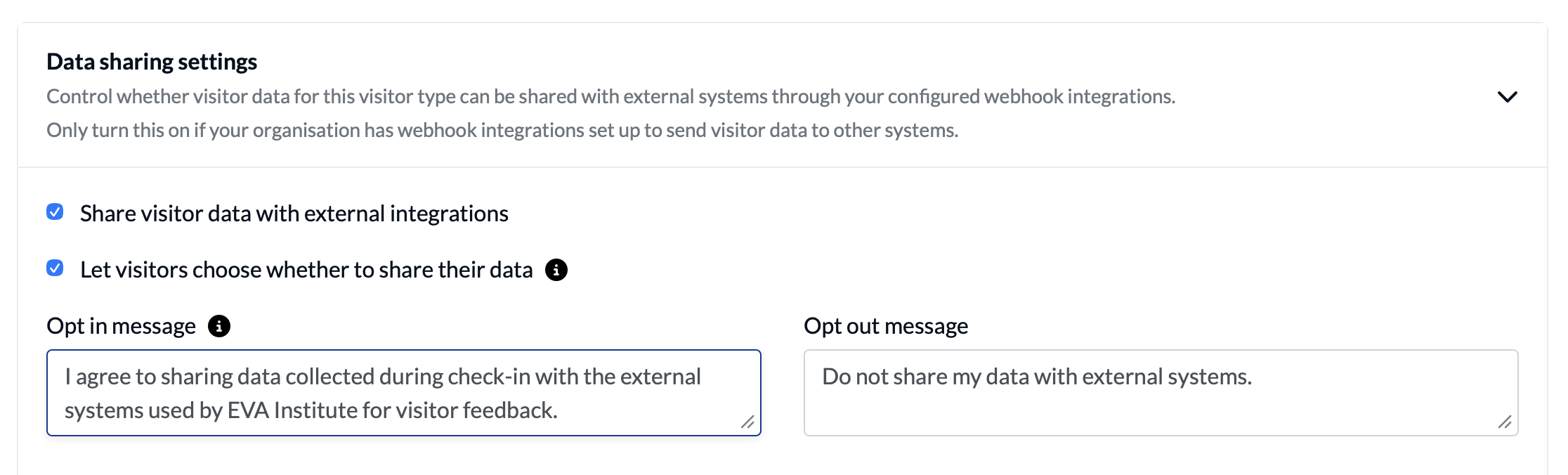
Visitors will see this data sharing choice when they first check in for that visitor type.
Write your consent message
Your consent message should help visitors understand what they are agreeing to.
Explain:
- what information is shared
- which external system or systems receive the information
- why the information is shared
Avoid broad wording such as:
I agree to data sharing.
Instead, use wording that is specific to your organisation and integration.
Opt-in message
The default opt-in message is:
I agree to sharing visitor information collected with the external systems used by [your company] for [purpose].
For example:
I agree to share the visitor information collected with the external systems used by Acme Construction for health and safety reporting.
Opt-out message
The default opt-out message is:
Do not share my data with external systems.
Help text
Use the help text to guide administrators who configure the message:
Explain what data is being shared, who it is shared with, and why.
Revoke a visitor’s consent
An administrator can revoke consent for an individual visitor from their visitor profile.
- Go to Overview > Visitor profiles.
- Find and open the visitor’s profile.
- Find Data sharing consent.
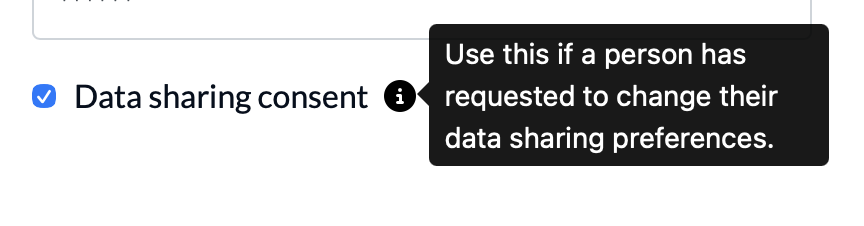
- Clear the setting.
- Select Save.
The visitor’s data will no longer be shared through the relevant outbound integrations.
Things to consider
Use clear, specific wording
Visitors need enough information to make an informed choice. Name the external system where possible and explain the purpose of sharing data.
Choose visitor types carefully
You may not need data sharing for every visitor type. For example, it may be required for contractors who need to be included in health and safety reporting, but not for general visitors.
Review multiple integrations
A visitor type may have more than one outbound integration. If data is sent to multiple systems, make this clear in your consent message.
Keep your privacy process up to date
Review your organisation’s privacy information and internal process before enabling data sharing. Make sure staff know how to respond if a visitor asks to withdraw consent.