EVA Pass
EVA Pass helps make visitor check-in faster and easier.
It is a reusable digital pass that visitors can save to Apple Wallet or Google Wallet and scan at the kiosk when they arrive or leave.
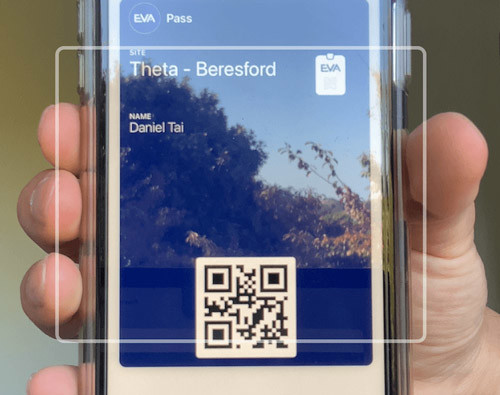
Scanning an EVA Pass saved on a visitor’s phone
Table of Contents
What is EVA Pass?
EVA Pass is a reusable visitor pass for EVA Check-in.
You can send it to pre-registered visitors, or provide it during check-in if EVA Pass is enabled for your site.
Once a visitor has saved their pass, they can use it again on future visits.
How EVA Pass works
A visitor receives an EVA Pass and saves it to their phone.
When they arrive on site, they scan the pass at the kiosk to begin check-in.
EVA then checks what information is already available for that visitor and what steps still need to be completed.
Depending on your check-in setup, EVA may:
- reuse visitor details that have already been provided
- skip screens the visitor does not need to complete again
- ask only for missing or newly required information
This helps returning visitors move through check-in more quickly.
What EVA Pass remembers
EVA Pass can reduce repeated data entry by reusing visitor information that has already been collected.
For example, if a visitor has already provided their:
- name
- email address
- phone number
- company
- other required profile details
they do not need to enter those details again unless something has changed or a new required field has been added.
If new required fields have been added since the visitor last registered, EVA will show only those missing fields.
How check-in steps may be skipped
If a visitor has already completed pre-arrival or check-in steps, EVA may not need to show those steps again.
This depends on how your check-in process and certificate settings are configured.
For example, EVA may skip:
- pre-arrival screens
- arrival screens
- visitor detail screens that have already been completed
This can create a much faster experience for returning visitors.
Visit-specific information
Some information stays with the visitor and can be reused each time they visit.
Other information is specific to a particular visit and may need to be entered again for a future visit.
This means a returning visitor may still be asked for details that relate only to that visit, even if their EVA Pass is still valid.
EVA Pass is available to all EVA Check-in customers.
IMPORTANT! Passes can only be scanned on the EVA kiosk mobile app, so you need to be using that for passes to work.
How to set up EVA Pass
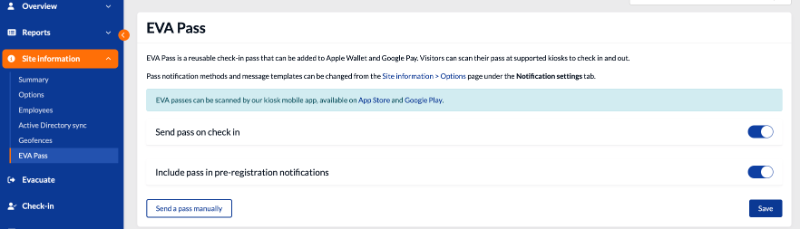
To set up EVA Pass, go to the EVA Pass setup page for your site.
You have options to send a pass on check in, and include a pass in pre-registration notifications. You can also send a pass manually.
When EVA Pass works best
EVA Pass works best when:
- visitors return to your site regularly
- you want to reduce queues at the kiosk
- you want visitors to avoid entering the same details more than once
- your check-in process and certificate settings are set up to support repeat visits
If your process includes steps that should only be completed once, you can set EVA up so those steps do not need to be repeated unnecessarily.
Where EVA Pass can be used
Visitors can currently scan EVA Pass at an EVA kiosk.
In development: EVA Pass scanning from the mobile app.
Benefits of EVA Pass
Using EVA Pass can help you:
- speed up visitor check-in
- reduce repeated data entry
- improve the experience for returning visitors
- reduce queues at busy times
For visitors, it means a quicker and simpler arrival experience.
Frequently asked questions
Is EVA Pass reusable?
Yes. EVA Pass is designed to be reused for future visits.
Will a visitor need to enter their details every time?
Not usually. EVA can reuse details that have already been provided and ask only for anything that is missing.
Will a visitor ever need to complete fields again?
Yes. If a field is visit-specific, or if your configuration has changed and new required fields have been added, EVA may ask for more information.
Can EVA Pass skip pre-arrival or arrival steps?
Yes, in some cases. This depends on how your site’s check-in process and certificate settings are configured. If the visitor is still being asked for name, phone, email, or other details, EVA still needs required information for that check-in.